
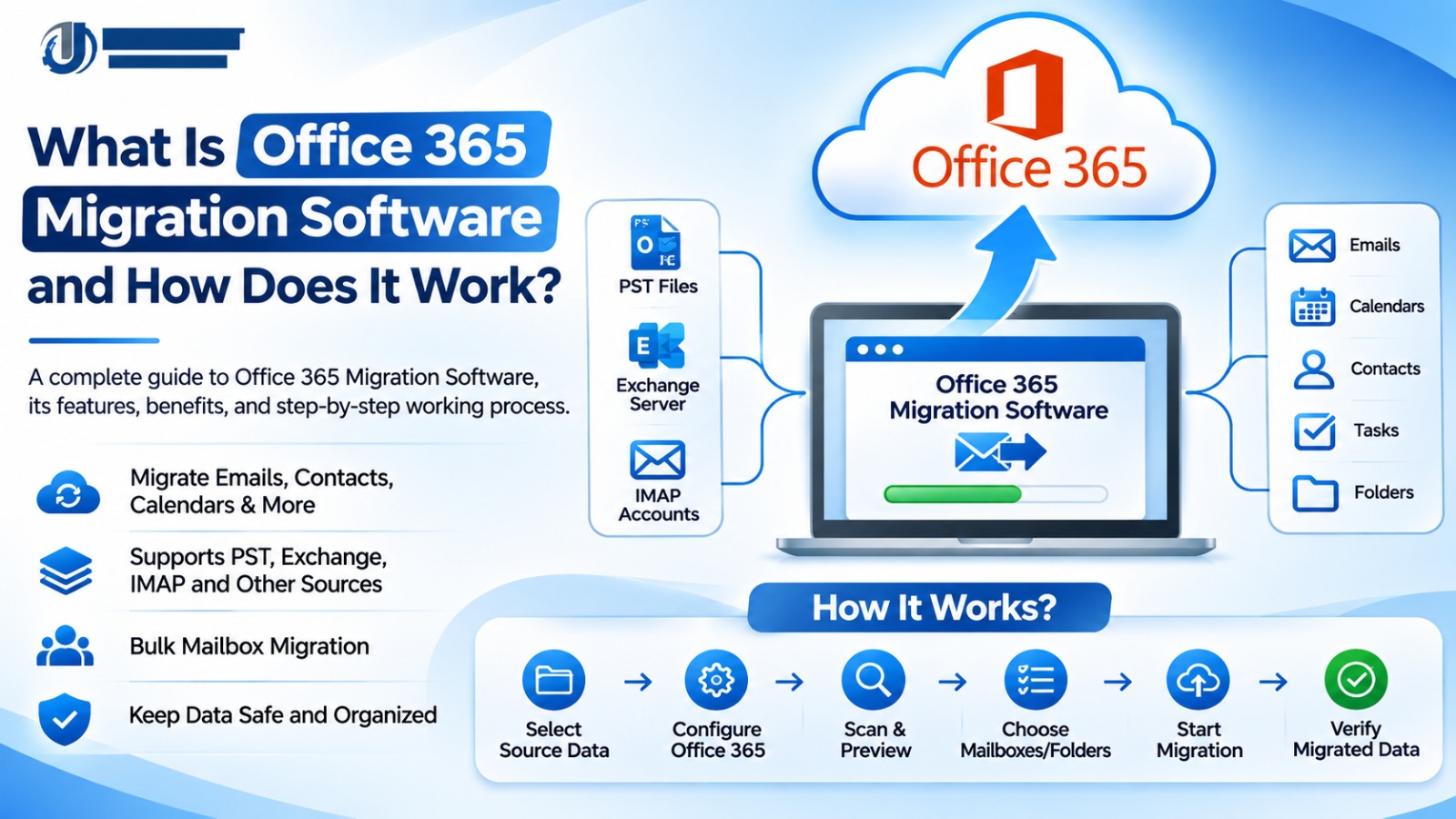
Modern businesses rely heavily on the cloud for email and other collaboration tools. Many organizations have moved to Microsoft 365 (formerly Office 365) to provide cloud-based email, document management, file storage, and other collaboration tools to their employees. However, moving existing email accounts, mailboxes, and business data to Microsoft 365 can be a challenge for organizations with large amounts of information.
To simplify the process of migrating email data and other mailbox content to Microsoft 365, Office 365 Migration Software can be used. This software automates the process of transferring email data and other supported mailbox content from a variety of sources to Microsoft 365. Rather than having to manually move emails and attachments, users can rely on migration software to help simplify the process of migrating email data and other mailbox content to Microsoft 365.
This article explores in detail the functionality, benefits, key features of Office 365 Migration Software and why it is so important for modern businesses.
What Is Office 365 Migration Software?
Office 365 Migration Software is software specifically designed to transfer email data, mailbox content, and other supported information from existing email platforms or from the PST files on on-premises Exchange Servers to Exchange Online.
The software can be used for the migration of on-premises Exchange Server mailboxes to Microsoft 365, for the migration of other email platforms to Microsoft 365, for the migration of email accounts from IMAP-based email servers to Microsoft 365, and for the migration of other supported email clients and mailbox formats to Microsoft 365.
Depending on the software’s capabilities, it may support migration from:
Outlook PST files to Office 365 mailboxes.
Exchange Server mailboxes to Microsoft 365.
IMAP-based email accounts to Office 365.
Other supported email clients and mailbox formats.
Multiple source mailboxes to Microsoft 365.
An Office 365 Migration Tool of high quality is able to simplify the migration process of email data and other mailbox content to Microsoft 365 by providing features for the selection of mailboxes, the configuration of the migration, the monitoring of the migration, as well as the creation of reports.
The software can be used as a bridge between the existing email environment of an organization and the Microsoft 365 environment.
How Does Office 365 Migration Software Work?
Typically, Office 365 Migration Software works in a series of steps. While the exact workflow of a migration tool may vary, most follow a similar process to migrate email data and other supported mailbox content to Microsoft 365.
In the first step, the user selects the data to be migrated. This can be PST files, Exchange mailboxes, IMAP-based email accounts or other supported source data.
The user selects the files to be migrated or defines the source email environment. Many applications also allow users to browse for folders and to select individual mailboxes.
After selecting the source data, the user configures the destination Microsoft 365 environment.
This may require:
Microsoft 365 account details.
Destination mailbox information.
Appropriate administrator permissions.
Authentication through supported Microsoft sign-in methods.
Access to the required Exchange Online services.
Correct destination configuration is essential for successful migration.
Some applications first scan the selected files or mailboxes before transferring any information.
This process enables the user to find all available folders, email messages, attachments, etc. in the selected source files or mailboxes and also to find any inaccessible or corrupted files or mailboxes.
After scanning the source files or mailboxes for folders, email messages, attachments, etc. the user can select the mailboxes or folders that need to be migrated.
For example, when migrating Outlook PST files, the user can select Inbox, Sent Items, Drafts, Contacts, Calendar, etc. folders to be migrated to Office 365.
In many cases, organizations do not need to transfer the entire mailbox archive to Microsoft 365. Rather, they can transfer only the relevant information to Microsoft 365.
After configuring the source and destination for the migration, the user starts the migration.
The software then starts the migration process for the selected source files or mailboxes and transfers the supported email data to the selected Microsoft 365 mailboxes. The migration can be carried out for individual files, for multiple mailboxes or even in a bulk migration job.
The speed of migration depends on many factors, such as file size, available internet connection, server performance, limits of Microsoft 365, etc.
The last step of a migration is to verify the migrated email data in the destination mailboxes.
The administrator can verify the migrated email messages, the attachments, the folders, etc. in the destination mailboxes. Reports and logs of the migration software can also help to identify errors and to find out which files or mailboxes have been skipped.
Verification is an important part of maintaining data accuracy and reducing the risk of missing business information.
Key Features of Professional Office 365 Migration Software
When choosing an Office 365 Migration Tool, businesses should focus on the technical capabilities of the software rather than the price.
Here are some important features to consider.
Bulk Mailbox Migration
Bulk migration allows for the transfer of multiple mailboxes and/or data files in a single migration workflow. This is ideal for organizations with many employee accounts.
PST File Migration
For organizations that are migrating from an on-premises Exchange Server with PST files, the PST to Office 365 migration tool can migrate the supported PST files to the Microsoft 365 mailboxes.
Selective Data Migration
This feature enables users to choose specific mailboxes, folders, or other supported data types to be migrated, which helps in avoiding unnecessary data transfer and makes managing the migration process easier.
Folder Structure Preservation
For email migration to Microsoft 365, the original folder structure of the email should be preserved. Many professional migration tools can preserve the supported folder structure during migration.
Progress Monitoring
The migration progress indicators help users to track the status of the migration. In addition, users can check the detailed logs and reports to find any errors during the migration process.
Secure Authentication
The Office 365 Migration Tool should be able to authenticate with Microsoft 365 in a secure manner. It should use the supported authentication methods and securely handle the user’s account credentials.
Benefits of Using Office 365 Migration Software
Migrating email data manually can be complicated, especially for organizations with large mailboxes and many accounts. The use of migration software can simplify many aspects of the process.
Saves Time – Automated migration workflows can help to reduce the amount of time that would be spent on repetitive manual tasks by the administrator of the migration project.
Simplifies Bulk Transfers – Organizations with multiple supported mailboxes or files can manage the migration of all of these in a single workflow, depending on the capabilities of the software.
Improves Migration Management – Features such as mailbox selection, progress tracking and migration reports can help administrators to manage the migration process more effectively.
Supports Data Organization – Organizations can use the migration software to selectively migrate the email data that they require, and to preserve the folder structure of the migrated email data.
Reduces Manual Errors – The use of automation can help to reduce the number of errors that are associated with repetitive manual operations. However, data verification is still required.
Supports Business Continuity – A well-planned and executed migration of email data can help an organization to move to Microsoft 365 with minimum disruption to its day-to-day email communication.
Office 365 Migration Software vs. Manual Migration
Organizations can migrate to Microsoft 365 using native migration methods provided by Microsoft, or via specialized third-party migration software.
However, for more complex migration projects, such as those with multiple data sources, large PST files, selective data transfer, or other specialized requirements, the use of dedicated migration software may be more appropriate.
The best migration approach will depend on the volume of mailboxes to be migrated, the level of technical expertise within the organization, the available migration methods, the organization’s security requirements, the budget, and the complexity of the migration project.
Third-party software should not automatically be considered better than Microsoft’s native tools. Organizations should compare the available features against their actual migration requirements.
How to Choose the Best Office 365 Migration Software?
When choosing an Office 365 Migration Tool, several factors need to be considered:
Source compatibility: Check whether the software supports your existing email platform and file formats.
Microsoft 365 compatibility: Confirm support for your destination environment and current authentication requirements.
Bulk migration: Look for multi-mailbox processing if you manage several accounts.
Data integrity: Check whether emails, attachments, and supported folder structures can be preserved.
Security: Review authentication, encryption, credential handling, and data privacy practices.
User interface: Select software with a clear and manageable workflow.
Technical support: Check whether the provider offers installation guidance and troubleshooting assistance.
Free trial: Test the application with sample data before purchasing a full license.
The free trial can help users to evaluate the software’s compatibility with their systems and performance before they purchase the software.
Common Office 365 Migration Challenges
Even with the use of a professional Office 365 migration tool, there are many common technical issues that can arise during the migration process.
Common challenges include:
Incorrect Microsoft 365 login credentials.
Insufficient mailbox permissions.
Large PST files and mailbox size limitations.
Network interruptions during data transfer.
Microsoft 365 throttling and service restrictions.
Unsupported source formats.
Duplicate or skipped email items.
Authentication and connectivity errors.
Administrators can prevent many of these problems by checking account permissions, testing the connection to the source environment, verifying the integrity of the source files, and following the Microsoft recommended migration procedures.
It is strongly recommended to take a backup of the important source data before starting the migration of mailboxes.
Conclusion
Office 365 Migration Software is a very useful tool to transfer email data and other mailbox content to Microsoft 365. This software can help to simplify the complex email migration projects.
Whether you are migrating PST files, Exchange mailboxes, or other email accounts to Microsoft 365, choosing the right Office 365 Migration Tool can help to make the process of the migration of email data and other mailbox content to Microsoft 365 more organized and easier to manage.
Before purchasing a professional Office 365 Migration Tool, it is important to evaluate its compatibility with your source environment, its security features, its supported features, and its free trial version.
Frequently Asked Questions (FAQs)
Office 365 Migration Software is software specifically designed to transfer email data, mailbox content, and other supported information from existing email platforms or from the PST files on on-premises Exchange Servers to Exchange Online.
Typically, Office 365 Migration Software works in a series of steps: 1. Select the source data, 2. Configure the Microsoft 365 destination, 3. Scan the source data, 4. Select the folders and mailboxes to be migrated, 5. Start the migration, 6. Verify the migrated data in the destination mailboxes.
Yes, you can import Outlook PST files to Microsoft 365 using Microsoft native migration methods or using compatible third-party PST migration software.
Some of the professional migration tools can be used for bulk migration of multiple mailboxes and/or data files in a single migration workflow.
Many of the migration tools can transfer the email attachments along with the email messages. However, users should verify the supported data types of the migration software and test the results.
Free tools and native migration options may be suitable for basic requirements. However, businesses should evaluate compatibility, migration limits, security, and technical support before selecting a solution.
The duration of the Office 365 migration depends on the size of the mailboxes, the number of accounts to be migrated, the network speed, the performance of the source and destination servers, and the Microsoft 365 service limits.
Yes, it is strongly recommended to take a backup of the important source data before starting the migration of mailboxes.
?*try to Free Download enables you to preview & converted file and save 30 items per folder.




0 Comments