
Unlock
7-Zip Files Fast with JDR 7Z Password Recovery Software — The Best 7Z Password
Recovery Tool in 2025
Are
you facing problem because your 7Z file protected with password and you can’t
remember the password? You are not alone. Several people use the trustworthy archive
format 7 Zip to compress and encrypt files — but that encryption makes it
nearly impossible to recover lost password and open the archive without the
correct password. That is where JDR 7Z Password Recovery Software comes in a
power and user-friendly solution designed to help you recover lost and
forgotten 7Z file password and Unlock 7Zip file protection without create
problem.
Why
Use JDR 7Z Password Recovery Software
·
Restore access to locked 7Z archives: This JDR 7Z File Password Recovery
Software has been built to recover your lost and forgotten Zip file password in
case you have forgotten the password used for its encryption. Support provided
by the software includes all versions of 7Z/7Zip Archives, making it a
trustworthy tool no matter when the archive was created.
·
Multiple Recovery Methods for
Flexibility: The
software offers three tried-and-trusted methods, including Brute Force Attack,
Mask Attack, and Dictionary Attack, so you can choose which fits your situation
best. Whether your password is complex or you remember part of it, there's a
method for you.
·
No risk to data integrity: Many anxious users fears that
password recovery tools might corrupt or alter the contents of the archive. JDR
7Z Password Recovery Software promises no data loss, conserving internal structure
and content of your files while recovering the password.
·
Easy for Non-technical Users: The software contains a simple
graphical user interface; hence, using it doesn't require special technical
skills. The process is straightforward: add the locked 7Z file, select a
recovery method, and then start the recovery. Once done, copy the recovered
password to the clipboard and unlock your archive.
·
Works on most modern Windows systems: Supporting all variants of modern
Windows, including Windows 11, 10, 8.1, 8, 7, and Vista, this software will
most likely run seamlessly on your computer.
Why JDR’s Solution Stands Out
7-Zip
uses the 7z format, which is well-known for its robust encryption (AES-256,
optional filename encryption) and potent compression, making it a popular
option for safe archiving. Strong encryption does, however, also make it very
difficult to access data if the password is lost. Due to multiple rounds of
hashing and strong key derivation using SHA-256, typical brute-force attempts
on a 7z file can be resource-intensive and time-consuming.
In order to overcome this trouble, Download JDR 7Z Password Recovery Software provides specialized algorithms (Brute Force
+ Mask + Dictionary) along with an intuitive user interface, making recovery
possible even for non-techies.
Additionally, users can regain access
without running the risk of corruption or data loss because JDR places a high
priority on data security and asserts that it never modifies internal archive
data.
Who Should Use It
·
Users
who compressed sensitive documents, photos, or large data in a 7Z file and
forgot the password.
·
Professionals
and small business owners who depend on 7z encryption for secure backups and
archives.
·
Windows
OS users seeking a straightforward and secure utility rather than inconvenient
CLI applications or manual brute-force scripts.
·
Recovery
backup plan for any user who tried to open a password-protected 7z file and got
locked out.
How to Work JDR 7Z Password Recovery Software
STEP 1:Download and Install JDR 7Z Password Recovery Software

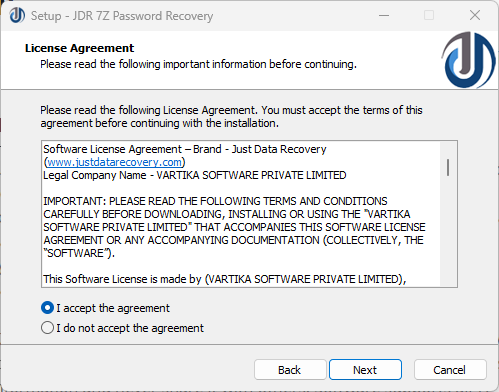
STEP 3:Browse & Select destination location to restore 7Z password Recovery Software
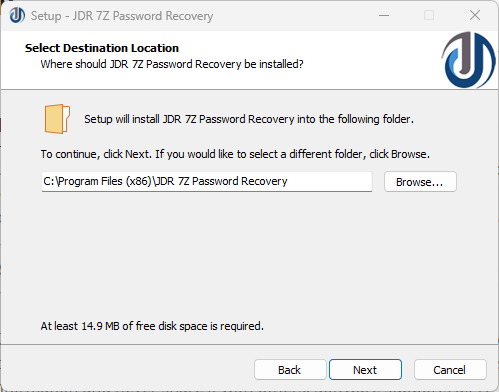
STEP 4:Browse & Select destination location to restore 7Z password Recovery Software

Final Thoughts
If you have a password-protected 7Z
archive in idle mode, just because you forgot the password, then don't lose
hope. When strong encryption is involved, the risk of losing data forever is
pretty high. With JDR 7Z Password
Recovery Software, you will get a robust, safe, and user-friendly solution
through which 7Z password-protected files can be recovered, 7Zip file
protection can be unlocked, and access can be regained in minutes.
This software makes password recovery an easy process for
both non-technical users and IT professionals, thus making it one of the best
options for 7Z Password Recovery Software.
*try to Free Download enables you to preview & converted file and save 30 items per folder.




0 Comments