Introduction JDR PST to MBOX Converter
Many users and organizations often need to convert email data from Microsoft Outlook's proprietary PST (Personal Storage Table) format to the more universally supported MBOX (Mailbox) format. This conversion is especially useful when migrating emails from Outlook to email clients like Mozilla Thunderbird, Apple Mail, or other applications that support MBOX files.
Understanding PST and MBOX Formats
Outlook PST (Personal Storage Table): Outlook PST files are created and used by Microsoft Outlook 2003, 2007, 2010, 2011, 2013, 2016, 2019, 2021 and Microsoft 365 – Outlook Classic to store emails, contacts, calendars, and other mailbox items. PST is a proprietary format, meaning it is not natively supported by most email clients outside the Microsoft ecosystem.
MBOX (Mailbox): MBOX is a widely used file format for storing email messages on Unix-based systems and many popular email clients. Unlike PST, MBOX is open and compatible with various platforms and applications.
Why Convert PST to MBOX?
- To switch from Outlook to Thunderbird, Apple Mail, or other MBOX-compatible email clients
- For archiving and backup purposes
- To facilitate migration between operating systems (e.g., Windows to macOS or Linux)
- To ensure long-term accessibility of email data
Methods for PST to MBOX Conversion
There are several methods to convert PST files to MBOX format. Below are the most common approaches:
1. Using Third-Party Converter Tools
Many software solutions are available that specialize in PST to MBOX conversion. Examples include JDR PST to MBOX Converter, vMail PST Converter, and PDS for PST to MBOX. These tools typically offer:
- User-friendly interfaces
- Batch conversion capabilities
- Support for large PST files
- Preservation of email metadata and attachments
To use a third-party converter:
- Download and install the converter software (e.g., JDR PST to MBOX Converter)
- Launch the application and select your PST file
- Choose the destination folder for the output MBOX files
- Start the conversion process and wait for it to be completed
- Import the resulting MBOX files into your desired email client
2. Manual Conversion (Indirect Method)
If you prefer not to use third-party software, you can perform a manual conversion by exporting emails from Outlook to a format compatible with other email clients (such as EML) and then using those clients to create MBOX files. This process is more complex and time-consuming but can be useful for small datasets.
- Export emails from Outlook to EML format
- Import EML files into Thunderbird or another MBOX supporting client
- Use the client's export feature to save messages as MBOX files
Key Features of JDR PST to MBOX Converter
- Easy-to-use interface suitable for both beginners and advanced users
- Supports conversion of multiple PST files in one go
- JDR PST to MBOX Converter maintains the properties of email metadata, attachments, and folder hierarchy
- Compatible with all versions of Outlook PST files
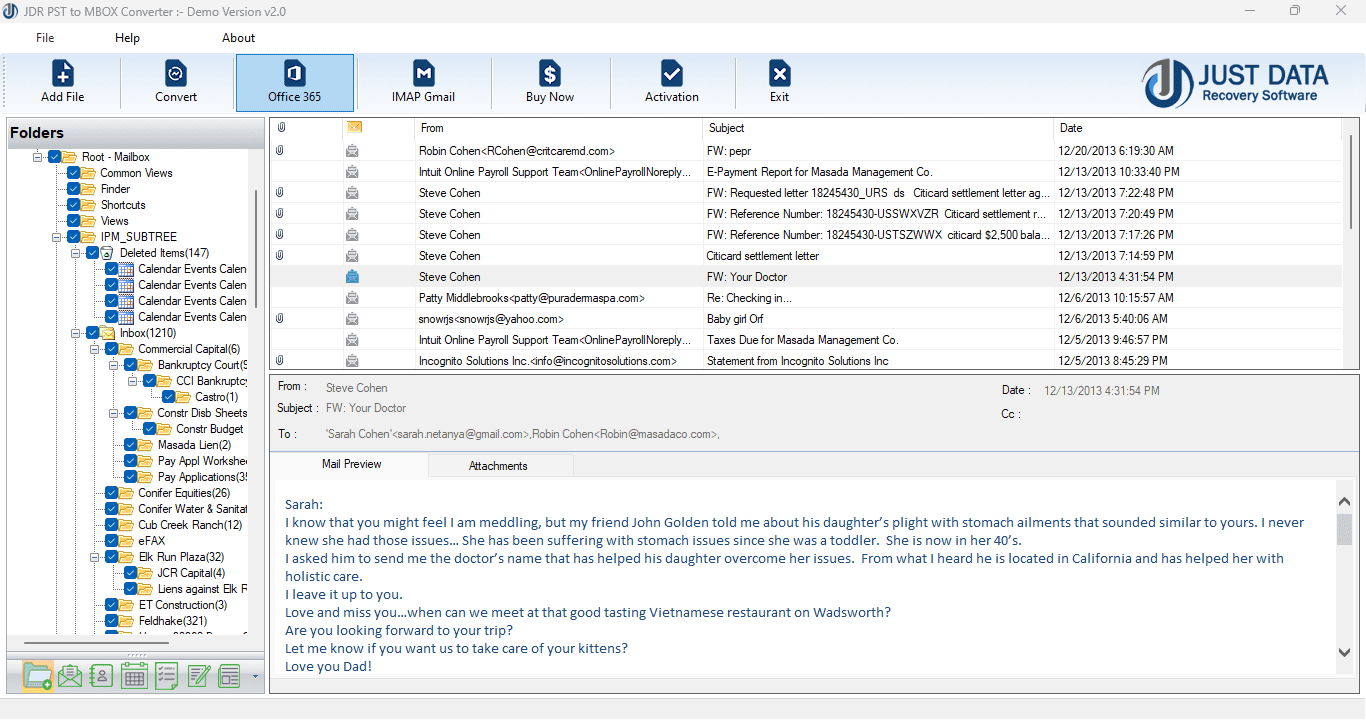
- Provides preview options before conversion
- Fast and reliable performance
Step-by-Step Guide: Using JDR PST to MBOX Converter
- Install the Software: Download and install JDR PST to MBOX Converter from the official website
- Add PST Files: Open the application and click on "Add File" to select the PST files you wish to convert
- Preview Emails: Use the preview feature to inspect your email content before conversion
- Select Output Format: Choose MBOX as the output format and specify the destination folder
- Start Conversion: Click "Convert" to begin the process. The tool will export your emails to MBOX files
- Import to Email Client: After conversion, import the MBOX files into your preferred email client (e.g., Thunderbird)
Tips and Best Practices
- Always create a backup of your original PST files before starting the conversion
- Ensure your target email client supports MBOX files
- Check the integrity of converted emails and attachments after import
- If converting large PST files, make sure you have enough disk space
Conclusion
Converting PST files to MBOX format is a straightforward process with the right tools. Whether you choose an automated solution like JDR PST to MBOX Converter or opt for manual conversion methods, you can ensure your email data remains accessible and portable across different platforms and email clients. Always follow best practices to safeguard your data and verify the results post-conversion for a smooth migration experience.
*try to Free Download enables you to preview & converted file and save 30 items per folder.





0 Comments