Introduction - JDR OLM to PST Converter
The JDR OLM to PST Converter is a specialized software tool created to transform OLM (Outlook for Mac) files into PST (Personal Storage Table) files, which work with Microsoft Outlook for Windows. This guide offers an overview of OLM and PST file formats, explains why conversion is needed, and highlights the main features and advantages of using a dependable converter.
Understanding OLM and PST Files
- OLM Files: These are data files used by Microsoft Outlook on Mac computers. They store emails, contacts, calendars, tasks, and other mailbox items.
- PST Files: These are data files used by Microsoft Outlook on Windows. PST files serve a similar purpose as OLM files but are not natively compatible with the Mac version of Outlook.
Why Convert OLM to PST?
Users often need to transfer their mailbox data from Outlook for Mac to Outlook for Windows. Since OLM files cannot be directly opened in Windows Outlook, converting them to PST format is essential for seamless migration. Common scenarios include:
- Switching from Mac to Windows computers
- Moving work environments or organizations
- Backing up mailbox data in a universally accessible format
- User-Friendly Interface: Offers a simple and intuitive design suitable for both technical and non-technical users.
- Batch Conversion: Enables the simultaneous conversion of multiple OLM files to PST.
- Preserves Data Integrity: Keeps original folder structure, email formatting, attachments, and metadata during the conversion.
- Selective Conversion: Allows users to choose specific folders or items to convert, saving time and storage space.
- Preview Feature: Allows users to preview mailbox contents before conversion.
- Compatibility: Supports all major versions of Outlook for Mac and Outlook for Windows.
- Fast Processing: Provides quick conversion speeds without sacrificing data accuracy.
- Install the Software: Download and install the JDR OLM to PST Converter on your Windows computer.
- Add OLM Files: Launch the application and use the 'Add File' option to import your OLM files.
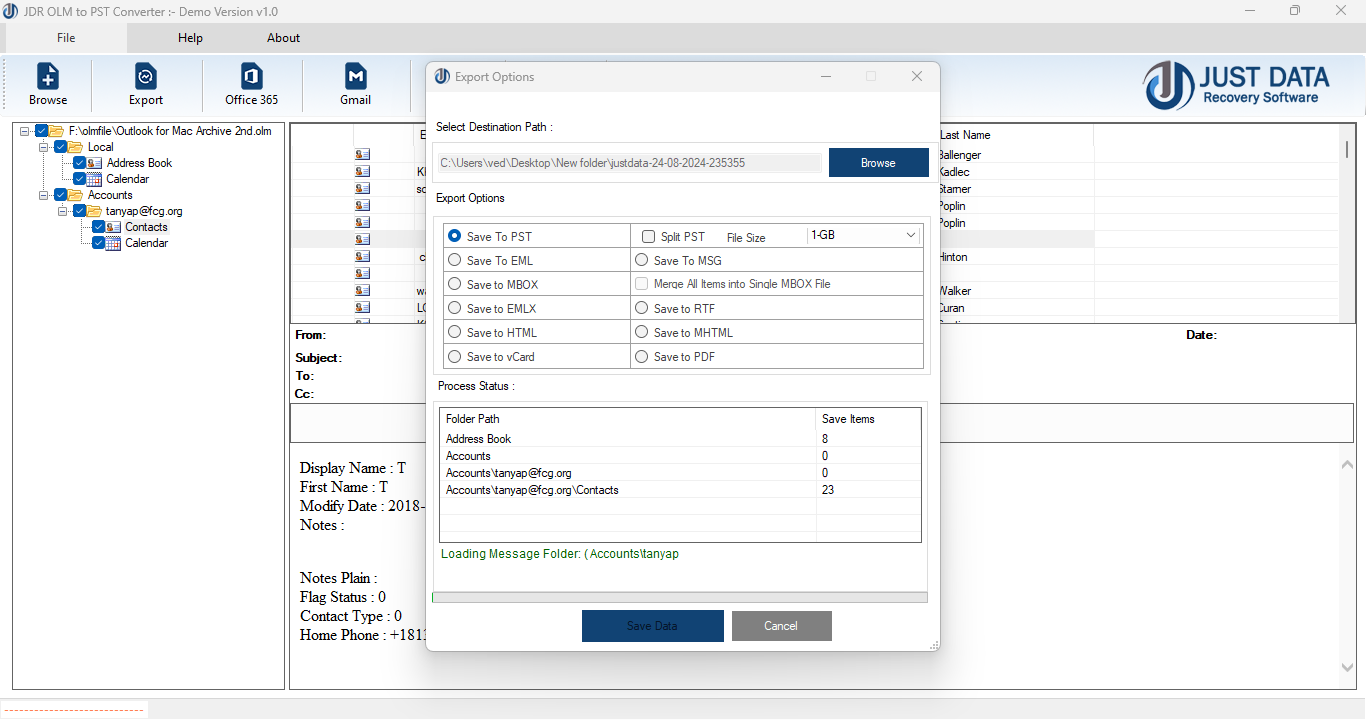
- Select Output Location: Choose where to save the converted PST files.
- Customize Conversion: Select specific files to convert if needed, or use default settings for a full conversion.
- Start Conversion: Click the 'Convert' button to begin. Track the progress and wait until it completes.
- Import PST to Outlook: After conversion finishes, open Microsoft Outlook and import the PST files using the 'Import/Export' feature.
- Seamless Migration: Easily transfer mailbox data between platforms with minimal effort.
- Data Security: Ensures that sensitive information is transferred safely and confidentially.
- Time Efficiency: Automates complex conversion steps, saving users significant time and reducing errors.
- Support and Updates: Access to customer support and regular software updates for improved performance.
Conclusion
The JDR OLM to PST Converter is an essential tool for anyone needing to migrate mailbox data from Mac to Windows environments. Its robust feature set, ease of use, and reliable performance make it a top choice for both individual users and organizations.
*try to Free Download enables you to preview & converted file and save 30 items per folder.





0 Comments